
Why bundle serverless functions
Serverless platforms charge for compute time and memory allocation. When you deploy an unoptimized source file, the cloud provider must download, parse, and initialize every dependency on the first request. This creates a "cold start" penalty that can add hundreds of milliseconds to your response time, making your application feel sluggish or causing timeouts under sudden traffic spikes.
Bundling with Rollup collapses your node_modules tree into a single, optimized JavaScript file. By removing unused code (tree-shaking) and minifying the output, you drastically reduce the deployment package size. Smaller packages download faster and initialize quicker, directly lowering your cold start latency.
Beyond speed, bundling simplifies dependency management. Many serverless runtimes have limited support for modern ES modules or specific Node.js versions. Rollup allows you to write modern, clean code while outputting a compatible bundle that runs reliably across AWS Lambda, Azure Functions, and other edge environments. This ensures your local development experience matches the production runtime without complex configuration hacks.
Set up the rollup configuration
To bundle serverless functions effectively in 2026, you need a Rollup configuration that respects the Node.js runtime environment. The primary goal is to produce small, standalone bundles for each Lambda function while keeping shared dependencies external. This approach reduces cold start times by minimizing the payload size that AWS or other providers must download and initialize.
The following setup uses @rollup/plugin-node-resolve to find modules, @rollup/plugin-commonjs to handle non-ESM packages, and @rollup/plugin-json for configuration files. Crucially, we use the serverless-rollup-plugin to automate the process, ensuring each function is bundled individually rather than creating one massive, inefficient bundle.
First, install the core Rollup packages and the serverless plugin. You will also need esbuild for faster bundling if you choose that route, though the standard plugins work well for most Node.js libraries.
npm install --save-dev rollup @rollup/plugin-node-resolve @rollup/plugin-commonjs @rollup/plugin-json serverless-rollup-plugin
Create a configuration file at the root of your project. This file defines the input entry points (your Lambda handlers) and the output format. For serverless, cjs (CommonJS) is usually the safest bet for compatibility with existing Node.js libraries, though esm is gaining traction.
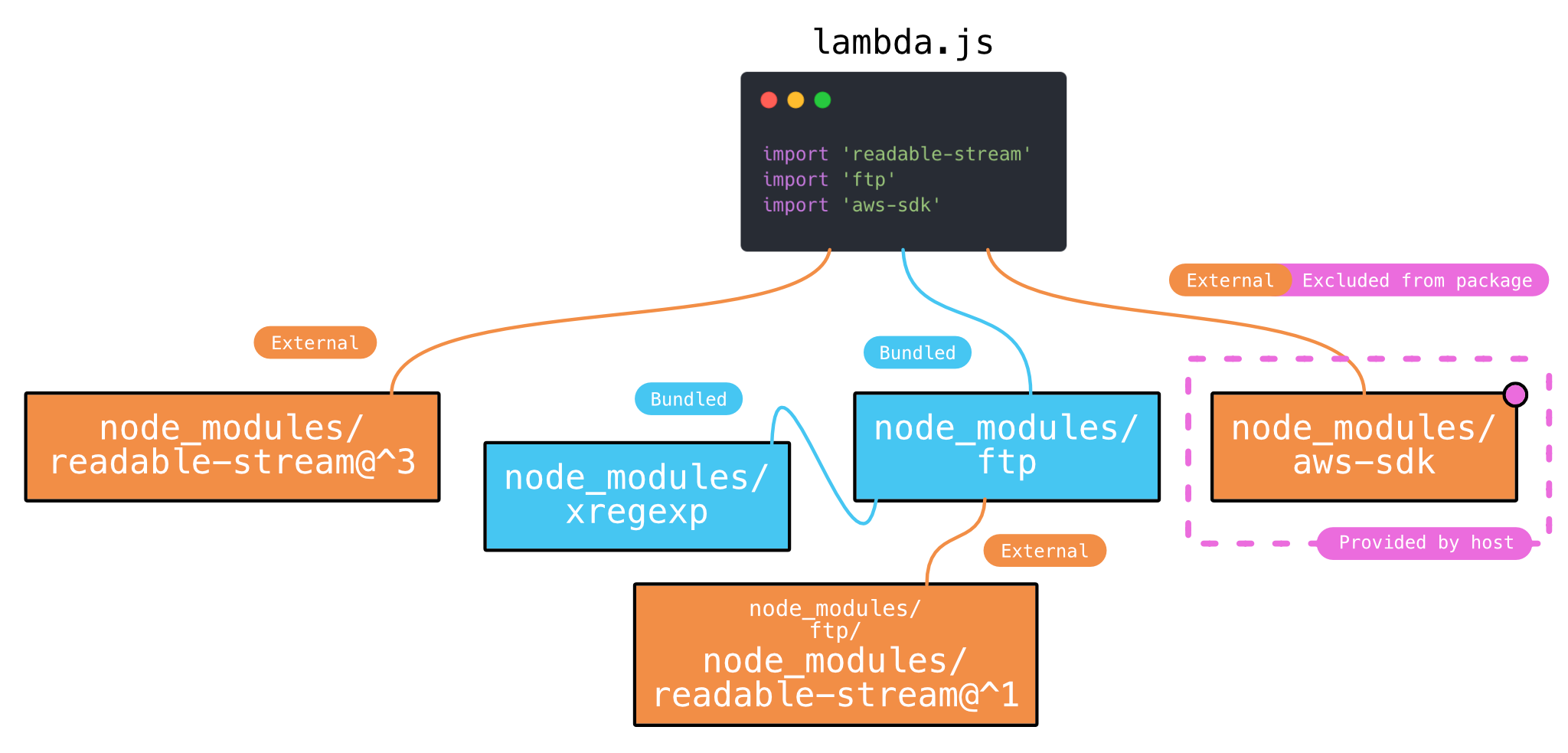
The most critical part of this setup is marking aws-sdk and other runtime dependencies as external. You do not want to bundle the AWS SDK into your function; it is already available in the Lambda environment. Bundling it increases size unnecessarily and can cause conflicts.
// rollup.config.js
export default {
  input: 'src/handler.js',
  output: {
    file: 'dist/bundle.js',
    format: 'cjs',
    sourcemap: true
  },
  external: ['aws-sdk'],
  plugins: [
    nodeResolve(),
    commonjs(),
    json()
  ]
};
Finally, integrate the plugin into your serverless.yml. This allows the framework to run Rollup automatically before deployment. The plugin scans your service functions and applies the Rollup configuration to each one.
# serverless.yml
custom:
  serverless-rollup:
    includeModules: true
    packager: npm
This configuration ensures your serverless rollup 2026 workflow is optimized for speed and size. By keeping dependencies external and bundling only your application code, you maintain a lean deployment package.
Integrate Rollup with your deployment
The final step in the serverless rollup 2026 workflow is bridging the gap between your build artifacts and the cloud. While Rollup handles the module bundling, your deployment framework needs to know where those optimized files live. This integration ensures that the functions uploaded to AWS Lambda are lightweight, cold-start optimized, and contain only the code necessary for execution.
We will use the serverless-rollup-plugin to automate this process. This plugin hooks into the Serverless Framework lifecycle, running Rollup before deployment and replacing the raw source files with the bundled output. This approach keeps your repository clean and your deployment package small.
Install the plugin
First, add the plugin to your project. It works best as a development dependency since it is only needed during the build and deploy phases.
npm install --save-dev serverless-rollup-plugin
Configure serverless.yml
Update your serverless.yml to include the plugin. You can configure it globally for all functions or override settings per function. The plugin automatically detects your rollup.config.js file.
plugins:
  - serverless-rollup-plugin

custom:
  rollup:
    config: rollup.config.js
    # Optional: Specify output directory
    # outputDir: dist
Verify the build
Run a deployment to verify the integration. The plugin will output logs showing the Rollup compilation steps. Check the dist directory (or your configured output) to ensure the bundled files are generated correctly before the package is zipped.
serverless deploy
If you encounter errors, check that your rollup.config.js exports a valid configuration and that the output file paths match what the plugin expects. The plugin documentation provides detailed troubleshooting for common configuration mismatches.
Compare rollup alternatives
When bundling for serverless, the choice of tool affects cold start times and bundle size. While Rollup remains a standard for JavaScript libraries, modern serverless workflows often require evaluating Webpack and esbuild. Each tool handles ESM, tree-shaking, and configuration complexity differently.
The following comparison highlights where Rollup shines in serverless rollup 2026 contexts and where it may lag behind faster alternatives.
| Tool | Bundle Size | Build Speed | ESM Support |
|---|---|---|---|
| Rollup | Small (excellent tree-shaking) | Moderate | Native |
| Webpack | Larger (complex config) | Slow | Good (with config) |
| esbuild | Medium (basic tree-shaking) | Very Fast | Good |
Rollup produces the smallest bundles due to its aggressive tree-shaking, which directly benefits serverless cold starts. However, its configuration can become verbose when handling complex side effects. Webpack offers the most robust ecosystem for legacy codebases but suffers from slow build times. esbuild provides near-instant builds but lacks the nuanced tree-shaking capabilities that keep serverless payloads minimal.
Common bundling mistakes
Even with a robust rollup.config.js, serverless functions have specific constraints that can cause cold starts to spiral or deployment packages to exceed limits. The most frequent errors usually stem from treating local development environments like production lambdas.
Including native binaries incorrectly
Serverless runtimes often lack the native libraries your local machine has. If Rollup bundles a native module (like bcrypt or sharp) compiled for your local OS, the lambda will crash. Always verify that native dependencies are either excluded from bundling or rebuilt specifically for the AWS Lambda runtime environment.
Failing to mark external dependencies
Many developers forget to list shared SDKs as external. For example, the AWS SDK for JavaScript v3 is often pre-installed in the Lambda execution environment. Bundling it again adds unnecessary megabytes to your deployment package, increasing cold start times and storage costs.
Not configuring output format
Serverless functions require the commonjs output format (or specific ESM configurations depending on the runtime). Using the default esm or iife without proper configuration can lead to require is not defined errors. Ensure your Rollup output plugin matches the handler signature expected by your serverless framework.
Verify your optimized build
Before deploying, you must confirm that the Rollup bundle is both small and functional. A successful serverless rollup 2026 configuration should produce a single, executable JavaScript file that retains all necessary dependencies without bloating the payload.
Check file sizes
Inspect the output directory to ensure the bundle is significantly smaller than the unoptimized source. Large bundles increase cold start times, so compare the compressed size against your previous deployment. If the file size exceeds your baseline, review your external configuration to ensure no unnecessary packages are being bundled.
Test local execution
Run the function locally using your framework’s CLI (e.g., sls offline or sam local invoke) to verify the entry point resolves correctly. Ensure that environment variables are passed properly and that the function responds with the expected status codes and body content. This step catches resolution errors that bundlers might silently ignore.
Check the output file size. Ensure it is compressed and does not include unnecessary dependencies. Compare against your baseline to confirm optimization.
Run the function locally. Ensure the entry point resolves correctly and environment variables are passed. Catch resolution errors that bundlers might ignore.
Deploy to a staging environment. Verify that the function responds with expected status codes and body content under production-like conditions.
-
Bundle size is under baseline
-
Entry point resolves correctly
-
Local invocation succeeds
-
Staging environment responds as expected
Frequently asked: what to check next
Does serverless rollup 2026 support modern JavaScript features?
Yes. Modern bundlers like Rollup support the latest ECMAScript features out of the box. You do not need separate Babel configurations for standard syntax. For platform-specific APIs, use Rollup plugins to shim or polyfill features only when targeting older runtimes.
How do I handle cold starts when bundling with Rollup?
Bundling reduces the code footprint, which slightly lowers memory usage and startup time. To further reduce cold starts, keep your entry point lightweight. Avoid heavy synchronous operations in the top-level scope. Consider keeping large dependencies external if your platform supports edge caching of node_modules.
Should I bundle all dependencies into one file?
Not always. Tree shaking removes unused code, but bundling everything can increase the initial load. For serverless functions, a small, optimized bundle usually performs better than a massive monolith. Use Rollup to separate vendor code from your business logic if your runtime allows multiple file references.
Is Rollup better than Webpack for serverless functions?
Rollup produces smaller, cleaner output by default. It lacks the complex module resolution of Webpack, which is often unnecessary for serverless deployments. If you do not need complex code-splitting or legacy browser support, Rollup is faster and easier to configure for serverless rollup 2026 workflows.
No comments yet. Be the first to share your thoughts!