
4 Rollup 4 vs Vite 6: Choosing the Right Bundler for 2026
Rollup 4 and Vite 6 serve distinct roles in the 2026 bundling landscape, with Rollup optimized for library distribution and Vite designed for rapid application development. This section compares their configuration overhead, build performance, and migration paths to help you select the appropriate tool based on your project's specific architectural requirements.
-
Library bundling with Rollup 4
Rollup 4 excels at creating optimized, tree-shakeable bundles for reusable libraries. Its static analysis ensures minimal dead code reaches consumers, crucial for npm packages. The plugin ecosystem supports advanced transformations like ES modules to CommonJS conversion. Use it when your primary goal is distributing clean, framework-agnostic code rather than managing complex application state or hot module replacement during development. -
Application development with Vite 6
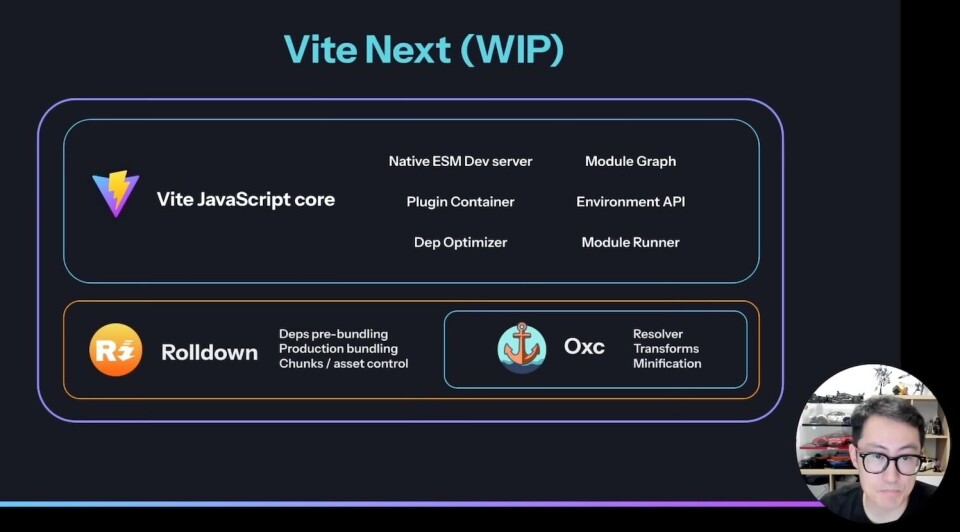
Vite 6 leverages native ES modules in the browser for instant server starts, bypassing traditional bundling during development. This approach provides rapid hot module replacement, significantly speeding up the feedback loop for frontend engineers. While it uses Rollup for production builds, the development experience focuses on speed and simplicity, making it ideal for large-scale applications requiring frequent code changes and immediate visual updates. -

Rollup 3 to 4 migration steps
Upgrading from Rollup 3 to 4 requires updating plugins to ensure compatibility with the new core. Check for deprecated options like manualChunks changes and adjust plugin configurations accordingly. Run npm update rollup and verify your build output. Test thoroughly, as some plugin behaviors may have shifted slightly. Consult the official changelog for specific breaking changes affecting your custom plugin chain or external dependency handling strategies. -
Performance benchmarks and trade-offs
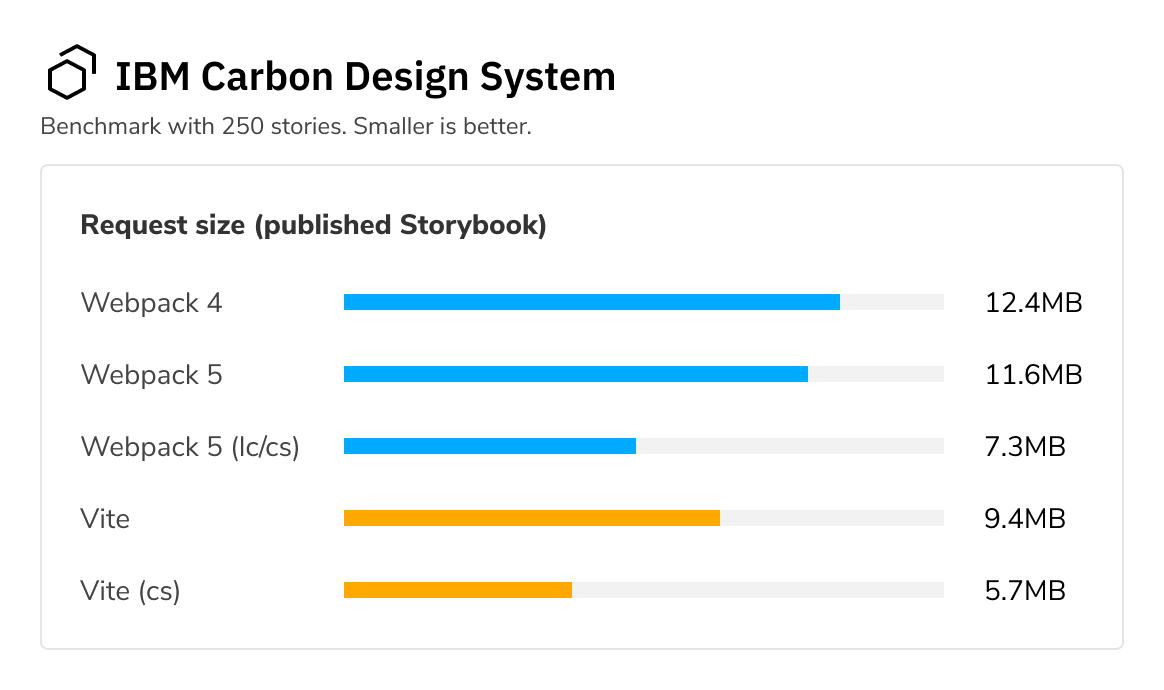
Vite 6 typically offers faster initial load times due to its native ESM strategy, while Rollup 4 provides superior production bundle optimization for libraries. Benchmarks show Vite’s dev server starts in milliseconds, whereas Rollup’s watch mode can be slower. Choose Vite for rapid iteration in app development. Select Rollup when library size and strict tree-shaking are critical for end-user performance in distributed packages.
Core Differences: Library Bundling vs. Application Development
Rollup 4 and Vite 6 serve fundamentally different stages of the JavaScript lifecycle. While both leverage the ES module specification, their architectures prioritize distinct outcomes. Rollup 4 is engineered for library distribution, focusing on static analysis and output optimization. Vite 6 is built for application development, prioritizing immediate feedback loops through native ESM and Hot Module Replacement (HMR).
Rollup 4 operates as a static bundler. It analyzes your source code at build time to eliminate unused exports, a process known as tree-shaking. This results in smaller, cleaner bundles suitable for npm packages. Because it does not include a development server, it assumes you are preparing a final artifact for consumption by other projects or end-users. Its strength lies in its ability to produce multiple output formats—such as ES modules, CommonJS, and UMD—from a single configuration.
Vite 6, conversely, functions as an application dev server and build tool. During development, it serves source files directly via the browser’s native ES module support, bypassing the need to bundle everything upfront. This provides near-instantaneous startup times and rapid HMR updates. When you are ready for production, Vite uses Rollup under the hood to generate the final optimized bundles. This dual nature makes Vite the standard for modern frontend frameworks like React, Vue, and Svelte.
The choice between them often depends on what you are building. If you are creating a reusable library, Rollup 4 gives you granular control over the final output structure. If you are building a user-facing application, Vite 6 provides the developer experience necessary for iterative work. Understanding this distinction prevents configuration mismatches and ensures you are using the right tool for the job.
Frequently asked: what to check next
Is Rollup better than Webpack?
Rollup excels at bundling libraries because it relies on static ES module analysis to perform aggressive tree shaking. This removes unused code, resulting in smaller bundle sizes compared to Webpack, which often requires manual configuration to achieve similar results. For application development, Webpack remains the standard due to its extensive plugin ecosystem and support for complex code-splitting strategies that Rollup does not natively provide.
What is the difference between Rollup and Vite?
Vite uses Rollup for its production builds but wraps it in a development server powered by esbuild. This allows Vite to serve unbundled code via native ES modules, resulting in near-instant server start times. Rollup is a standalone bundler focused solely on the build output. When choosing between them, use Vite for application development workflows and Rollup when you need fine-grained control over the final library bundle configuration.
How do I migrate from Rollup 3 to Rollup 4?
Migration involves updating your configuration to align with Rollup 4’s stricter defaults. Key changes include the removal of deprecated options and updates to how external dependencies are handled. Review the official migration guide for a complete list of breaking changes. Most projects require minimal code changes, primarily focusing on updating plugin versions and adjusting output format settings for UMD or IIFE bundles.
Work through Rollup 4 vs Vite 6
No comments yet. Be the first to share your thoughts!